DS3231 — i2c address & wiring
Temperature-compensated real-time clock, very low drift.
Key facts
DS3231 at a glance
| i2c address | 0x68 fixed address |
|---|---|
| Logic voltage | 3.3–5 V |
| Type | rtc |
| Part | Maxim DS3231 |
| Ships with | Qwiic, STEMMA QT |
| Datasheet | Maxim DS3231 — manufacturer documentation ↗ |
The chip
What the Maxim DS3231 actually is
High-accuracy real-time clock (RTC) featuring an integrated temperature-compensated crystal oscillator (TCXO), battery-backed timekeeping, programmable alarms, square-wave output and a 32.768 kHz reference output. Keeps calendar time far more accurately than RTCs relying on an external crystal.
Watch out: The popular ZS-042 module includes a crude charging circuit meant for a rechargeable LIR2032 cell. Fit a normal CR2032 and the module tries to charge it anyway — a genuine hazard. Use a LIR2032, or break the charge path (remove the charging resistor or diode) before inserting a non-rechargeable cell.
Wiring
How to connect the DS3231
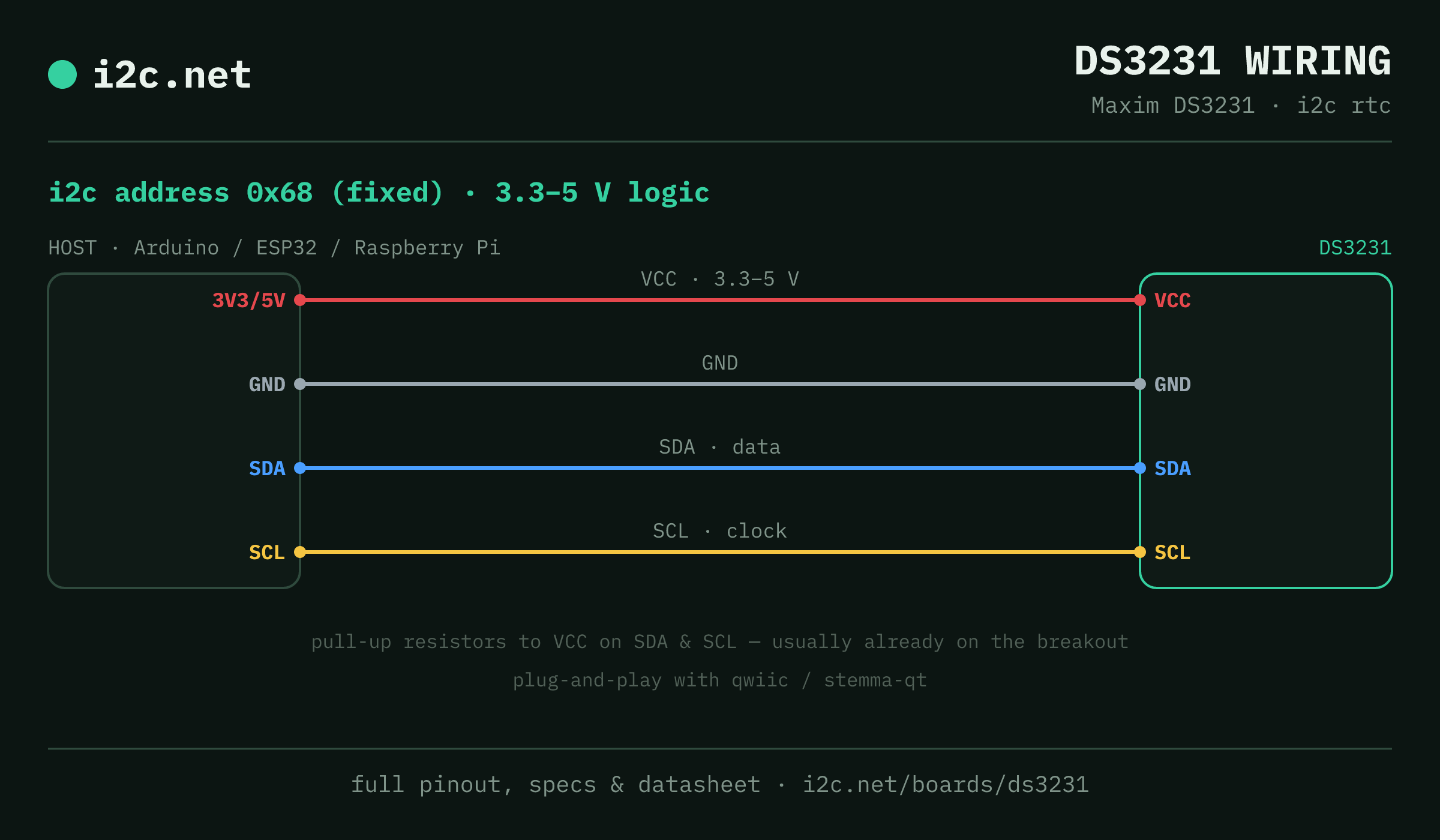
The DS3231 talks i2c at address 0x68. It runs at 3.3–5 V, so match your host's logic level — if your host is 5 V and a board on the bus is 3.3 V-only, add a level shifter. Use the compatibility checker to confirm the exact cable for your setup.
The address is fixed, so two DS3231s can't share a bus directly — the address-conflict guide covers the workarounds (multiplexer, second bus).
Wiring is the usual four: power, ground, SDA and SCL, plus pull-up resistors — almost always already fitted on the breakout. Nothing showing up? Run an i2c scanner first; if the bus is silent, the 7-step checklist finds it faster than guessing.
Ecosystems
Plug-together options for the DS3231
DS3231 breakouts ship with Qwiic and STEMMA QT — keyed 4-pin cables carrying power, ground, SDA and SCL, so there's nothing to solder and nothing to wire backwards. Chain it to the next board and keep going.
Running a mixed bench? Those ecosystems interoperate more than their marketing suggests — see every connector pairing for the cable or adapter you need, or the standards overview for how they compare.
Go deeper
Guides covering the DS3231
Alternatives
Other real-time clock boards
Watch the bus
Boards that clash with the DS3231
These want an address the DS3231 also answers (0x68), so they can't share a bus with it untouched. If one is address-selectable, strap it elsewhere; if not, the conflict guide covers the multiplexer and second-bus routes, and the collision roundup explains why a scan won't warn you.
Get one
Questions
DS3231 i2c FAQ
What is the DS3231's i2c address?
The DS3231 sits at a fixed address of 0x68. It can't be changed, so two of them can't share one bus without a multiplexer or a second bus.
What voltage does the DS3231 run at?
3.3–5 V logic. That range covers both 3.3 V and 5 V hosts, so it drops onto a Pi, ESP32 or Arduino without a level shifter.
Can I use two DS3231s on one i2c bus?
Not directly — every DS3231 answers to 0x68, so two on one bus would collide. Use a TCA9548A multiplexer to give each its own channel, or put the second one on a separate bus.
Does the DS3231 work with Qwiic and STEMMA QT?
Yes — DS3231 breakouts ship with Qwiic / STEMMA QT, so it plugs straight in with no soldering. Mixing ecosystems? The compatibility checker gives you the exact cable or adapter.
What should I watch out for with the DS3231?
The popular ZS-042 module includes a crude charging circuit meant for a rechargeable LIR2032 cell. Fit a normal CR2032 and the module tries to charge it anyway — a genuine hazard. Use a LIR2032, or break the charge path (remove the charging resistor or diode) before inserting a non-rechargeable cell.