MLX90614 — i2c address & wiring
Non-contact infrared thermometer — reads object temperature at a distance.
Key facts
MLX90614 at a glance
| i2c address | 0x5A fixed address |
|---|---|
| Logic voltage | 3.3–5 V |
| Type | sensor |
| Part | Melexis MLX90614 |
| Ships with | Gravity |
| Datasheet | Melexis MLX90614 — manufacturer documentation ↗ |
The chip
What the Melexis MLX90614 actually is
Non-contact infrared thermometer measuring the temperature of an object in its field of view alongside its own ambient temperature. A factory-calibrated thermopile behind an IR filter, speaking SMBus (i2c-compatible) — the classic part behind GY-906 modules.
Watch out: The part-number suffix silently sets supply voltage and field of view, and modules rarely say which variant they carry. Most GY-906 boards use the 3 V, ~90°-FOV variant — it averages everything in a wide cone, so don't expect spot readings at a distance.
Wiring
How to connect the MLX90614
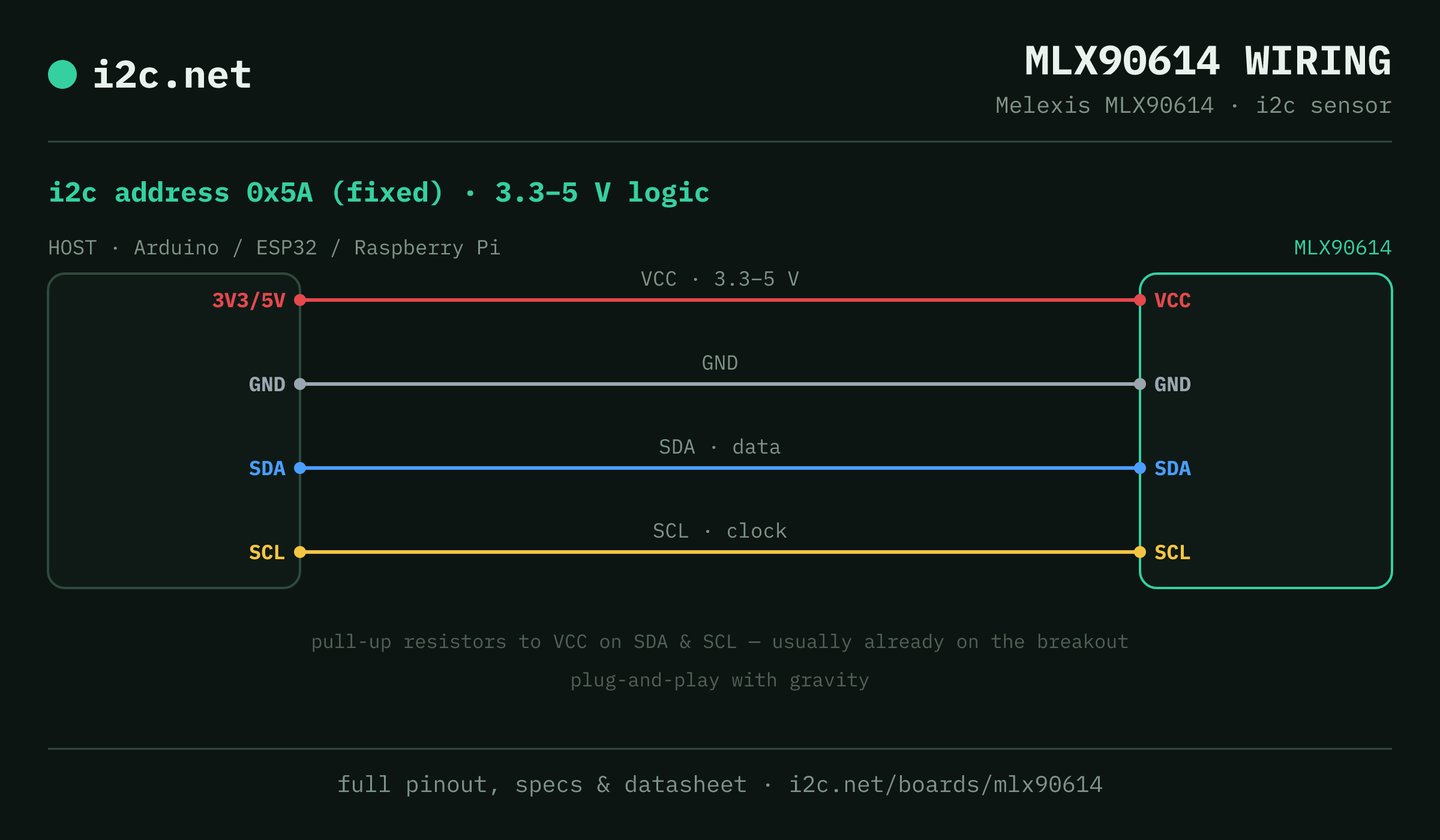
The MLX90614 talks i2c at address 0x5A. It runs at 3.3–5 V, so match your host's logic level — if your host is 5 V and a board on the bus is 3.3 V-only, add a level shifter. Use the compatibility checker to confirm the exact cable for your setup.
The address is fixed, so two MLX90614s can't share a bus directly — the address-conflict guide covers the workarounds (multiplexer, second bus).
Wiring is the usual four: power, ground, SDA and SCL, plus pull-up resistors — almost always already fitted on the breakout. Nothing showing up? Run an i2c scanner first; if the bus is silent, the 7-step checklist finds it faster than guessing.
Ecosystems
Plug-together options for the MLX90614
MLX90614 breakouts ship with Gravity — keyed 4-pin cables carrying power, ground, SDA and SCL, so there's nothing to solder and nothing to wire backwards. Chain it to the next board and keep going.
Running a mixed bench? Those ecosystems interoperate more than their marketing suggests — see every connector pairing for the cable or adapter you need, or the standards overview for how they compare.
Go deeper
Guides covering the MLX90614
Alternatives
Other environmental boards
Watch the bus
Boards that clash with the MLX90614
These want an address the MLX90614 also answers (0x5A), so they can't share a bus with it untouched. If one is address-selectable, strap it elsewhere; if not, the conflict guide covers the multiplexer and second-bus routes, and the collision roundup explains why a scan won't warn you.
Get one
Questions
MLX90614 i2c FAQ
What is the MLX90614's i2c address?
The MLX90614 sits at a fixed address of 0x5A. It can't be changed, so two of them can't share one bus without a multiplexer or a second bus.
What voltage does the MLX90614 run at?
3.3–5 V logic. That range covers both 3.3 V and 5 V hosts, so it drops onto a Pi, ESP32 or Arduino without a level shifter.
Can I use two MLX90614s on one i2c bus?
Not directly — every MLX90614 answers to 0x5A, so two on one bus would collide. Use a TCA9548A multiplexer to give each its own channel, or put the second one on a separate bus.
Does the MLX90614 work with Gravity?
Yes — MLX90614 breakouts ship with Gravity, so it plugs straight in with no soldering. Mixing ecosystems? The compatibility checker gives you the exact cable or adapter.
What should I watch out for with the MLX90614?
The part-number suffix silently sets supply voltage and field of view, and modules rarely say which variant they carry. Most GY-906 boards use the 3 V, ~90°-FOV variant — it averages everything in a wide cone, so don't expect spot readings at a distance.