SSD1306 OLED — i2c address & wiring
The ubiquitous 128x64 monochrome OLED.
Key facts
SSD1306 OLED at a glance
| i2c address | 0x3C0x3D address-selectable via pins/jumpers |
|---|---|
| Logic voltage | 3.3–5 V |
| Type | display |
| Part | Solomon SSD1306 |
| Ships with | Qwiic, STEMMA QT, Grove |
| Datasheet | Solomon SSD1306 — manufacturer documentation ↗ |
The chip
What the Solomon SSD1306 actually is
Monochrome OLED display controller supporting common resolutions including 128×64 and 128×32 pixels. Integrates display RAM (GDDRAM), display timing generation and charge-pump circuitry, with i2c or SPI interfaces depending on the module wiring.
Watch out: Two traps: module silkscreens often print the 8-bit address (0x78/0x7A) when your library wants the 7-bit 0x3C/0x3D — and the cheapest 1.3-inch 'SSD1306' modules are actually SH1106s, which draw shifted sideways under an SSD1306 driver.
Wiring
How to connect the SSD1306 OLED
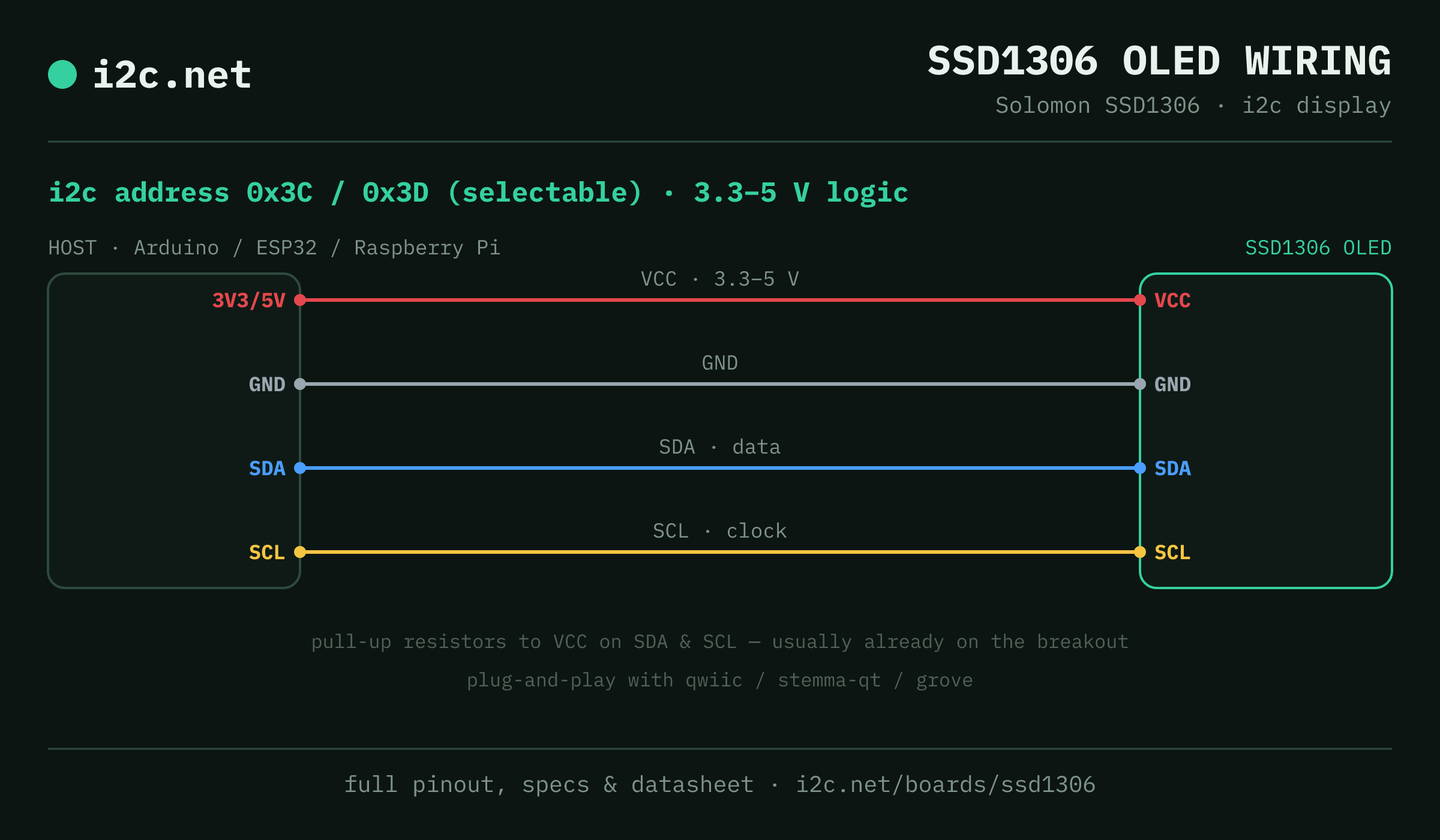
The SSD1306 OLED talks i2c at address 0x3C (up to 2 selectable addresses, handy when you need more than one on the same bus). It runs at 3.3–5 V, so match your host's logic level — if your host is 5 V and a board on the bus is 3.3 V-only, add a level shifter. Use the compatibility checker to confirm the exact cable for your setup.
Because the address is selectable, you can run several SSD1306 OLED boards on one bus by setting each to a different address — no extra wiring beyond the shared SDA/SCL.
Wiring is the usual four: power, ground, SDA and SCL, plus pull-up resistors — almost always already fitted on the breakout. Nothing showing up? Run an i2c scanner first; if the bus is silent, the 7-step checklist finds it faster than guessing.
Ecosystems
Plug-together options for the SSD1306 OLED
SSD1306 OLED breakouts ship with Qwiic, STEMMA QT and Grove — keyed 4-pin cables carrying power, ground, SDA and SCL, so there's nothing to solder and nothing to wire backwards. Chain it to the next board and keep going.
Running a mixed bench? Those ecosystems interoperate more than their marketing suggests — see every connector pairing for the cable or adapter you need, or the standards overview for how they compare.
Go deeper
Guides covering the SSD1306 OLED
Alternatives
Other display boards
Get one
Questions
SSD1306 OLED i2c FAQ
What is the SSD1306 OLED's i2c address?
The SSD1306 OLED uses 0x3C or 0x3D, selected with an address pin or solder jumper on the board. If a scan turns up something unexpected, our i2c address list names the usual suspect for every address.
What voltage does the SSD1306 OLED run at?
3.3–5 V logic. That range covers both 3.3 V and 5 V hosts, so it drops onto a Pi, ESP32 or Arduino without a level shifter.
Can I use two SSD1306 OLEDs on one i2c bus?
Yes — set each one to a different address (0x3C, 0x3D) using its address pin or jumper, then wire both to the same SDA/SCL. That gives you up to 2 on a single bus before you need a multiplexer.
Does the SSD1306 OLED work with Qwiic and STEMMA QT and Grove?
Yes — SSD1306 OLED breakouts ship with Qwiic / STEMMA QT / Grove, so it plugs straight in with no soldering. Mixing ecosystems? The compatibility checker gives you the exact cable or adapter.
What should I watch out for with the SSD1306 OLED?
Two traps: module silkscreens often print the 8-bit address (0x78/0x7A) when your library wants the 7-bit 0x3C/0x3D — and the cheapest 1.3-inch 'SSD1306' modules are actually SH1106s, which draw shifted sideways under an SSD1306 driver.