What is the I2C HID Device?
"I2C HID Device" is the Device Manager entry Windows uses for an input device — almost always your laptop's touchpad or touchscreen — that's wired to the chipset over the i2c bus and follows the HID input standard. It's built-in hardware, not something you plugged in, and underneath the Windows label is a real protocol worth understanding: HID over I2C.
Breaking down the name
i2c + HID, in one entry
Two standards meet in that label:
- i2c — Inter-Integrated Circuit, the two-wire serial bus the touchpad uses to reach the CPU internally. The same protocol that connects sensors to an Arduino connects your touchpad to your laptop's chipset.
- HID — Human Interface Device, the standard for input hardware (mice, keyboards, touchpads) that started on USB. It lets one generic driver handle a huge variety of devices without custom code per model.
So "I2C HID Device" means: an input device, speaking the HID standard, connected over i2c instead of USB. On a typical laptop that's the precision touchpad; on a 2-in-1 or all-in-one it may be the touchscreen. Microsoft's HID over I2C specification defines exactly how the mapping works — how HID's data model rides on plain i2c reads and writes.
The protocol
How HID over I2C actually works
What sets a HID-over-i2c device apart from a plain sensor on the bus is its structured, self-describing model — the same one USB HID uses, just fetched with i2c transactions instead of USB packets.
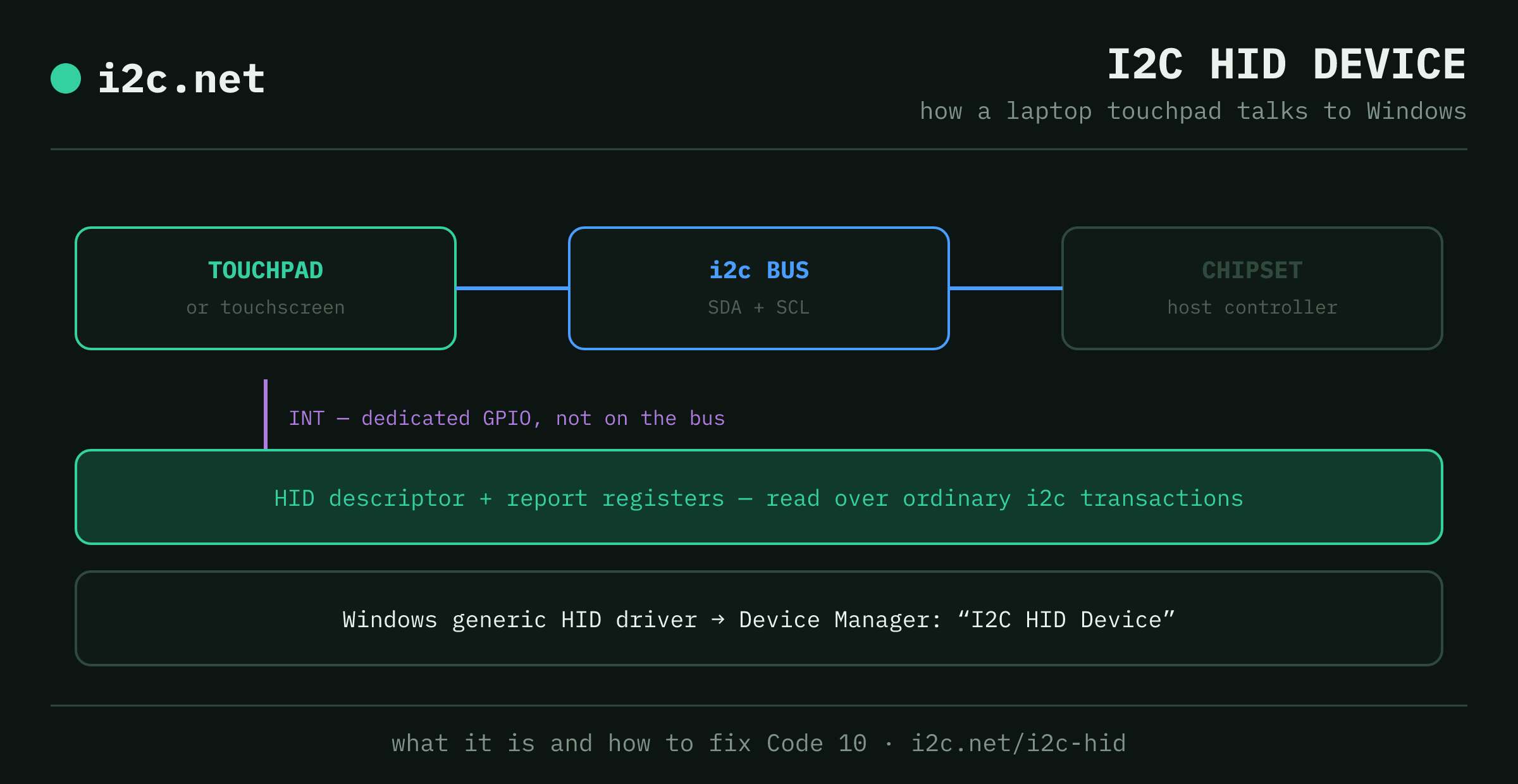
Discovery. Windows doesn't guess where anything lives. The device's ACPI entry tells the driver three things: the device's i2c address, which GPIO carries its interrupt, and the register address of its HID descriptor. Everything else follows from there.
The HID descriptor. At startup the driver reads the descriptor from that register. It advertises the device's capabilities — what reports it sends, their sizes, what each field means — and it's what lets one generic driver support a huge range of touchpads and touchscreens with zero per-model code.
The register model. Beyond the descriptor register, the device exposes a small, fixed set: a report descriptor register, input and output report registers, and a command register. The host writes commands and reads reports back — ordinary i2c reads and writes to the device's address, no special bus mode required.
The interrupt line. This is the detail that makes the whole design work. i2c itself has no "data ready" signal — polling a touchpad constantly would waste power and bus time — so HID over I2C adds a dedicated interrupt GPIO, separate from SDA and SCL entirely. The device only asserts it when it actually has something to report; the host does an i2c read in response, and the bus stays quiet otherwise. That event-driven model is exactly why the protocol suits battery-powered hardware.
Addressing and coexistence. A HID-over-i2c device is just another target with its own address, so in principle it can share a bus with sensors or memory under the usual rules — no address collisions, and a shared pull-up and capacitance budget. In practice, laptop vendors usually give the touchpad its own dedicated bus segment to keep its timing clean, but nothing about the protocol requires that.
Where it shows up
Built in, not plugged in
Because i2c is low-power and needs only two wires, HID over I2C is the default for input hardware that's permanently built into portable machines: precision touchpads, capacitive touchscreens, some integrated keyboards, and occasionally sensor hubs, across ultrabooks, 2-in-1s and tablets. External mice and keyboards still use classic USB HID — USB's hot-plug convenience matters more there than the power savings. The dividing line is roughly "built in and battery-conscious" versus "plugged in and swappable."
Troubleshooting
"I2C HID Device — Code 10" and other errors
If Device Manager flags the I2C HID Device with a yellow triangle, the touchpad or touchscreen it drives has usually stopped working. Error Code 10 ("This device cannot start") is the most common, and it's nearly always a driver issue rather than a hardware failure. In rough order of what fixes it:
- Update the driver from the laptop maker — get the touchpad/chipset/serial-IO driver from Dell, HP, Lenovo, ASUS etc. for your exact model, not a generic one.
- Uninstall and reboot — right-click the I2C HID Device → Uninstall device, then restart; Windows reinstalls it fresh.
- Roll back a recent driver update if the touchpad broke right after one.
- Check the serial-IO / GPIO drivers loaded first — the I2C HID Device depends on the chipset's i2c controller driver and the interrupt GPIO from the protocol section above; if either failed, this fails too.
Don't disable it to "fix" an error — on most laptops that just turns off the touchpad.
The bigger picture
Yes — it's the same i2c makers use
There's no separate "computer i2c". Your touchpad and an Arduino temperature sensor speak the identical two-wire protocol — a controller, a clock line (SCL), a data line (SDA) and addressed devices. That's less of a coincidence than it looks: i2c was built for consumer electronics in 1982 and ended up as computer infrastructure, from the touchpad here to the cable behind your monitor — the history explains how. HID over I2C is simply a well-defined, self-describing target sitting on that bus, the same fundamentals — addressing, pull-ups, capacitance — applied to the touchpad under your fingers. If the protocol itself is what you're curious about, start with what is i2c, or the byte-level how i2c works.
Questions
I2C HID Device FAQ
What is an i2c HID device?
I2C HID Device is the entry Windows shows in Device Manager for an input device — usually a laptop touchpad or touchscreen — that connects internally over the i2c bus and follows the HID (Human Interface Device) standard. It's not a device you plug in; it's the driver Windows uses to talk to hardware already inside your machine.
What is HID over I2C?
HID over I2C is Microsoft's specification for carrying the HID data model — the same descriptor-and-report system USB input devices use — over an i2c bus instead of USB. It lets one generic Windows driver handle any compliant touchpad or touchscreen, while the physical link enjoys i2c's low power draw and two-wire simplicity instead of a full USB controller.
What registers does an i2c HID device use?
A small, fixed set: a HID descriptor register (found via the device's ACPI entry), a report descriptor register, input and output report registers, and a command register. The host reads and writes them with ordinary i2c transactions — no special bus mode, just addressed reads and writes like any other i2c target.
Why does an i2c HID device need an interrupt line?
So the host doesn't have to poll. i2c has no way to signal 'data ready' on SDA/SCL alone, so HID over I2C adds a dedicated GPIO interrupt line, separate from the bus. The device asserts it only when a new report is ready — a finger moved, a key was pressed — and the bus stays idle the rest of the time, which matters a lot on battery power.
What does I2C HID Device Error Code 10 mean?
Code 10 ("This device cannot start") on the I2C HID Device usually means a driver problem, not dead hardware. The common fixes: update or roll back the touchpad/chipset driver from the laptop maker's site, uninstall the I2C HID Device in Device Manager and reboot to let Windows reinstall it, or check for a Windows serial-IO/GPIO driver that failed to load first.
Should I disable the I2C HID Device?
Only if you mean to disable the touchpad or touchscreen it drives — that's what will happen. On most laptops the I2C HID Device is the touchpad, so disabling it kills the touchpad until you re-enable it. If your pointer already stopped working, re-enabling or reinstalling this device is usually the fix, not disabling it.
Is this the same i2c used in Arduino and Raspberry Pi projects?
Same bus, different context. Your laptop's touchpad talks to the chipset over the exact same two-wire i2c protocol that sensors use on an Arduino — Windows just wraps it in the HID input standard. If you came here to learn the protocol itself, start with our what-is-i2c explainer.